Getting Started
Four steps, about 5 minutes. The guided setup walks you through the same steps and detects each one automatically — this page is the written version.
Add the Chrome extension
- Click “Add to Chrome — free to try” on the homepage, or open EQ Annotator in the Chrome Web Store
- Click “Add to Chrome” and confirm with “Add extension”
- Come back to the setup tab and click “Done — next step”
- Optional: pin the extension via the puzzle icon in Chrome’s toolbar
Can’t install Chrome extensions at work? Tell us — we help your IT team allow it.
Create your account
Enter your name, work email and a password — no credit card. Open the verification email and click the link.
After the link you land on Get started. It signs the extension in for you — no second password.
Connect Paligo
This creates your organisation and starts your free trial. Joining a colleague who already uses EQ Annotator? Ask them to invite you under Team and accept the invitation — then you skip this step.
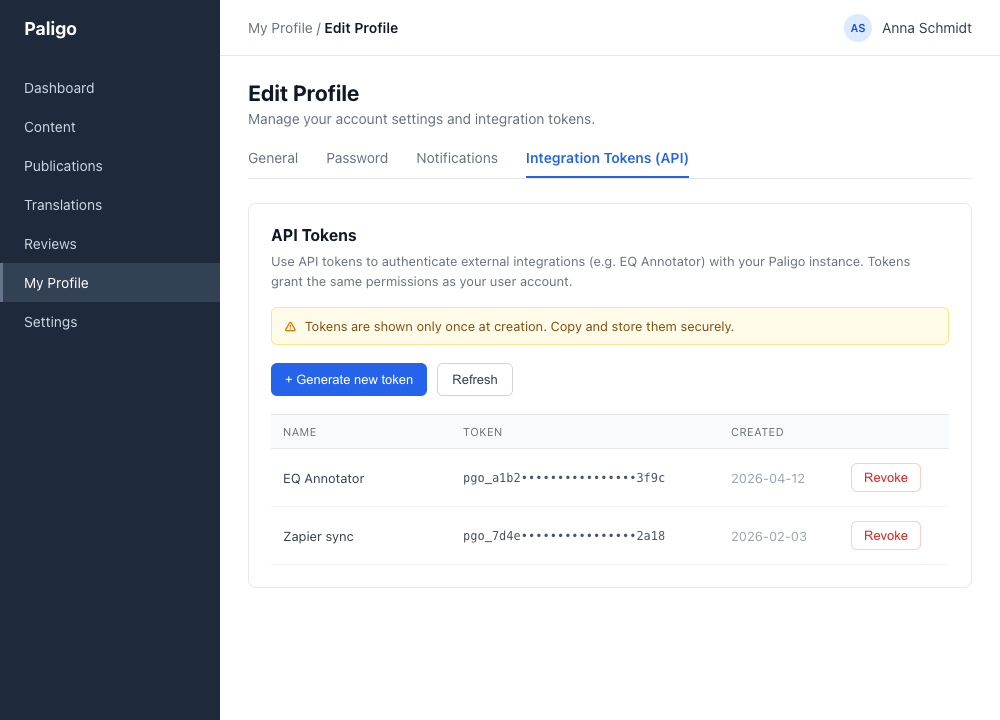
Otherwise you need a Paligo API key:
- In Paligo (e.g.
yourcompany.paligoapp.com), click your profile icon → Edit Profile - Scroll to API and click Generate API Key (or copy your existing key)
- On Get started, enter your Paligo address, your Paligo username (the email you sign in to Paligo with) and the API key
Note: you need admin or author permissions in Paligo to generate an API key. If your Paligo is already connected by another organisation, you can send its administrator a join request instead.
Annotate your first screenshot
- Open a topic with an image in the Paligo editor and click the image
- In the image toolbar, click the green Annotate button — on an image that already has callouts it reads Edit
- The EQ Annotator editor opens in a new tab with exactly that image
- Click to place numbered callouts and label them in the sidebar; drag for regions; use the arrow tool for arrows
- Click Save changes — the annotated image goes straight back into your Paligo topic
Tips
- No Annotate button? Reload the Paligo tab once — it has to be opened after the extension was added.
- Click a callout to select it, then change its color or size, or delete it
- Ctrl+Z / Ctrl+Shift+Z undo and redo
- Every save creates a version — you can restore older versions any time
- Your annotated images stay in Paligo, with or without EQ Annotator
Your trial and your team
- The free trial runs for 14 days with up to 3 seats and 20 MB storage — invite colleagues under Team.
- After the trial, the Standard plan is billed per named user and includes 500 MB storage for your organisation. See Pricing.
- Nothing stops working when you reach a limit or the trial ends. Your dashboard shows a notice, and we get in touch to sort it out with you.